The app that reminds you of your medication
and shares it with your family.

Blist reminds you of every dose, keeps count of the pills left and keeps the history. Use it for your own medication, your parents' or your children's, and share it with the people who help you care.

Available on iPhone and Android

Protected data · You decide who can see it · Free to start, no credit card required
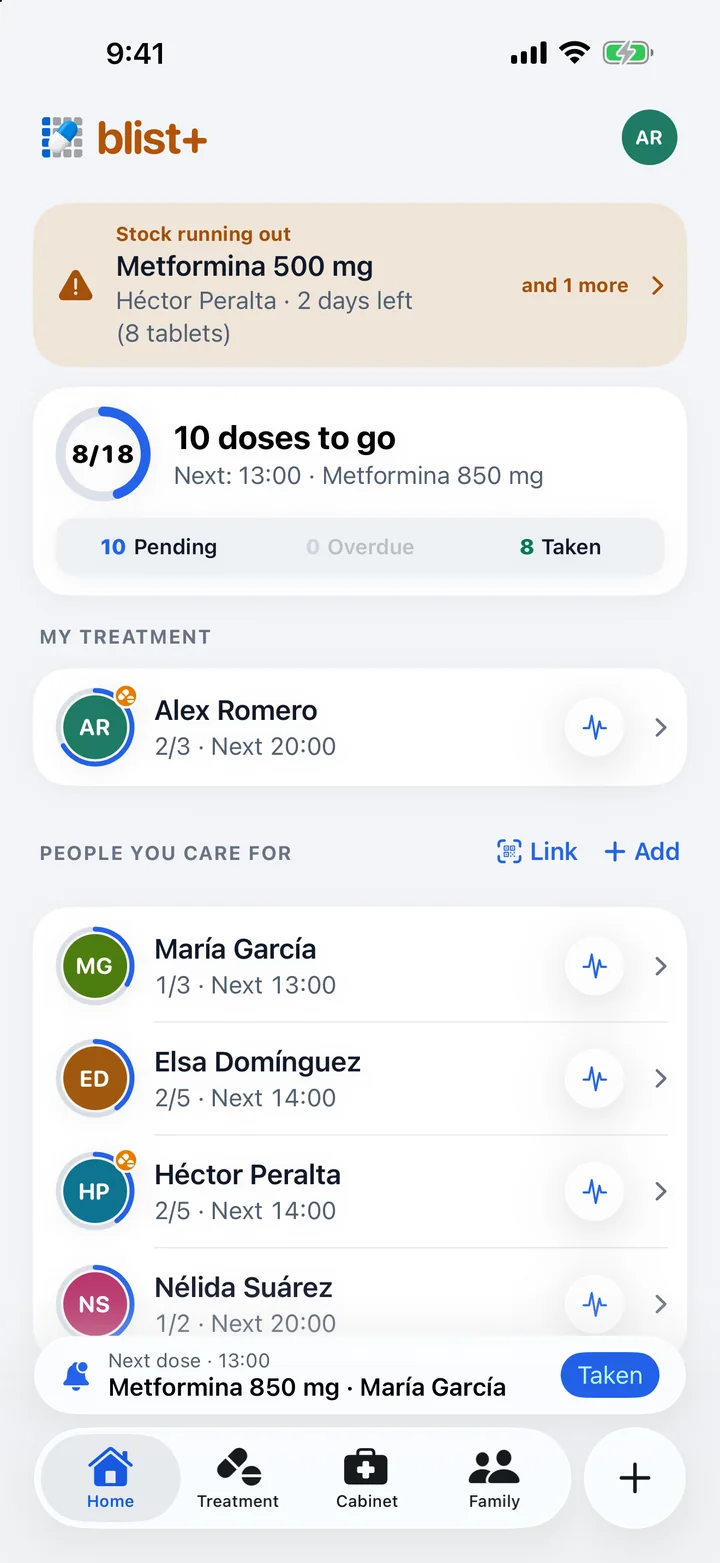
Blist with fictional data: your own medication and that of four people cared for, with today's doses and stock running out
Full app
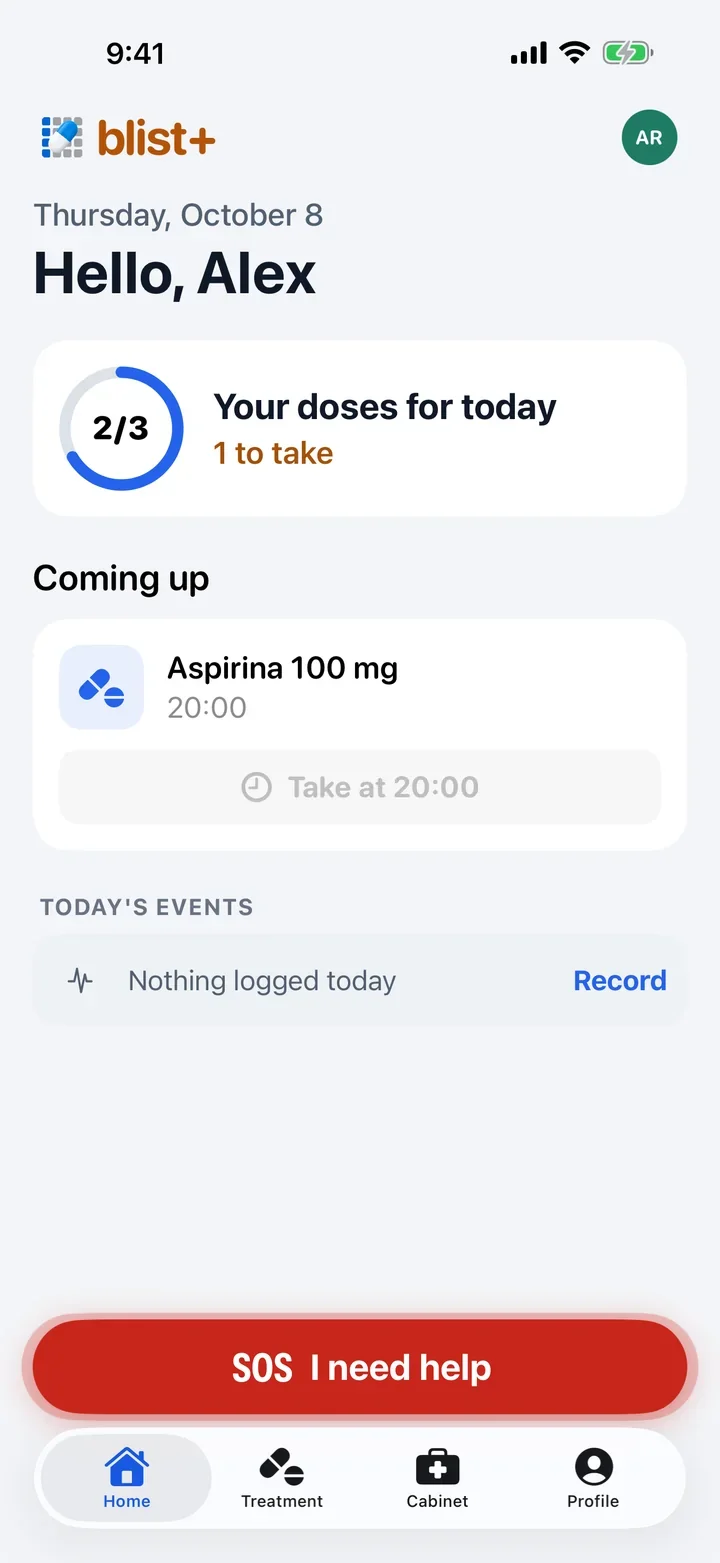
Blist's simple mode with fictional data: large text, today's doses, the next dose and the help button
Simple mode

How Blist organizes one person's medication and shares it with their care circle

Today

The same question, several times a day

When the information lives in group chats and in one person's memory, everyone ends up asking the same thing.

With Blist

Every dose in its place

The week is laid out: what was taken and what comes next. The answer is right there.

Together

And your care circle, in the loop

The people you add to your circle see the doses you share, each on their own phone.

M T W T F S S Has Elena taken it? When is the next dose? Can you tell me once it's taken? Elena Alex Lucía

How a family uses it

Caring for your parents or keeping the household's medication in order: everyday situations.

There are several of us siblings and nobody knows who is on it
The care circle shares out the tasks, and everyone sees what was taken without asking in the group chat.How to share caregiving among siblings
My mom lives alone and I work all day
She confirms each dose with one tap, or the circle keeps the record for her. You see the history from your phone.Supporting without deciding for the other person
Lots of medicines, and one always runs out on a Sunday
Blist counts how much is left of each one and flags those running low, so you can refill in time.Count in days, not boxes
The treatment changed at the last appointment
The routine is updated once and the whole circle sees the new one. The PDF history helps bring what was taken to the next appointment.When the treatment changes: what to check

Everything essential, so no dose is left uncertain

Set up the routine once, and the circle shares the same information.

Organize the routine
Add medications, doses, and schedules. Blist organizes the day's doses and estimates the available stock.See how it works
Share reminders
The people you invite can view the routine and receive the reminders relevant to them.See how it works
Know what happened
Confirmed, skipped, or pending doses remain in a shared history, avoiding questions and crossed messages.See how it works

What Blist is and what it does

For you, beyond your medication

Your health information, your appointments and what you log each day, in the same place as your routine. For the people you support, too.

Health profile, also as a PDF
Blood type, allergies, current medication, coverage and an emergency contact with a button to call or message. It can be shared as a PDF at no cost, and it is not an official medical record.See how it works
Appointments and vaccines, with a reminder
Schedule a medical appointment or a vaccine and get a reminder an hour before, with the address to get there and the option to add it to your calendar.
Measurements and a daily log
Blood pressure, weight, blood glucose, oxygen saturation or pulse, plus temperature, symptoms and notes, with the time and who logged them. Blist keeps what you enter; it does not interpret the values.
Confirm in one tap
From the home-screen widget, without opening the app. And for the doses that cannot slip by, a full-screen alarm. Reminders depend on your phone's permissions.See how it works
Invitations by QR or WhatsApp

Share the care information you choose

Send an invitation from the app. Once accepted, you share medication, confirmed doses, health profile, and care records with the permissions you define.

  • QR, WhatsApp, link, or numeric code
  • Separate information for each member
  • Permissions to view or help organize
blist

You have been invited to a care circle

To accept it you need the Blist app, on iPhone or Android. It is free to start.

Download Blist
Download Blist and create your account. Tap “I have an invitation”: the invitation is already copied.

Start with your circle and expand it when you need to

The Free plan covers your medication and one person close to you. Blist+ is for care shared by several people.

Included in every plan: reminders, stock tracking, health profile, care records, and the SOS button. The SOS button alerts your circle; it is not an emergency service. In an emergency, contact the appropriate local service.
Free
Everything essential, at no cost
$0
No expiration

Your own routine and that of someone close to you, with up to 2 caregivers helping.

  • Your medication and that of 1 person close to you
  • Up to 5 medications per person
  • Up to 2 caregivers per person cared for
  • History for the last 15 days
  • Reminders, stock, SOS, and health profile
Start for free

Protected data · You decide who can see it · Cancel anytime

Compare the plans in detail

Do you work at a clinic, care home, or care team?

Blist has a portal for institutions: a paperless medication record, a monthly report for each resident, and informed families. Tell us how your team works and we will see whether we can help.

Blist for institutions

Your information is not the business

Blist is paid for by its paid plans, not by advertising or by your data.

No advertising
There are no ads in the app and no advertising tools that follow you across other apps or websites.
We do not sell your data
We do not sell, rent or hand it over for commercial purposes. The providers that help us run the service process it under our instructions.
We measure use, not your health
To improve the app we count actions, such as how many doses are confirmed. Those counts never carry the name of a medication, a dose, a measured value or a note.

What you are probably wondering

Pricing, devices, reminders, and data: the questions we hear most often.

Can I use Blist for free and cancel Blist+ anytime?

Yes. There is a free plan with everything essential, and you can cancel Blist+ anytime. You keep its features through the paid period, then your account returns to the Free plan. The App Store or Google Play shows the price before you confirm.

Which devices and languages does Blist support?

If you have an iPhone, download Blist from the App Store; if you have Android, get it from Google Play. On both iPhone and Android, Blist is available in Spanish —including an Argentina variant—, English, French, and Portuguese. Notifications depend on device permissions and the operating system.

Does the person I care for need to use the app?

No. You can manage their routine, record doses, and track stock from your account. If they want to participate, they have a simple view; if they do not use a phone, the circle can keep the record for them. Blist is not only for older adults: each family member keeps their information separate and shares it only with people they authorize.

What happens to reminders when more than one person is involved?

Each person you invite receives the reminders relevant to their settings, and the history shows the whole circle whether a dose is pending or confirmed. As with any app, delivery depends on connectivity and the phone's notification permissions.

Is my data secure?

Blist applies security measures to protect your information. You decide which people in your circle can access your data. Read the details in our Privacy Policy.

What does SOS do, and what are Blist's medical limits?

Blist SOS sends a priority alert to invited caregivers and records it. Delivery depends on connectivity, permissions, and device status; it does not contact emergency services or guarantee receipt. Blist also does not diagnose, prescribe, or replace healthcare professionals. In an emergency, contact your local service first; ask a doctor or pharmacist about treatment decisions.

Guides to organizing medication

Practical answers to what comes up when organizing your own medication or that of someone close to you.

Printable medication sheet: how to fill it in and use it at home

One sheet with the current medication, to keep at home and take to appointments. How to fill it in, keep it up to date and turn it into reminders.

Read the guide

Count in days, not boxes: how to keep track of medication stock

Count in days rather than boxes, restock with margin and have someone in charge: how to know in time when it is time to restock.

Read the guide

What to bring to a medical appointment when you go with someone

An appointment is short and memory fails right there. This is what is worth having ready before you walk in, especially if you are going with someone else.

Read the guide

See all guides

Now available on iPhone and Android

Care should not depend on one person alone

Organize medication, invite your family, and start with the same information.

Download Blist on the App StoreDownload Blist on Google Play

On a computer?Scan the code with your phone's camera to open your phone's store.

Free to start · No credit card required